Skip to content
View in the app

A better way to browse. Learn more.

HAIF ➰ The Houston Area Information Forum

A full-screen app on your home screen with push notifications, badges and more.

To install this app on iOS and iPadOS
  1. Tap the Share icon in Safari
  2. Scroll the menu and tap Add to Home Screen.
  3. Tap Add in the top-right corner.
To install this app on Android
  1. Tap the 3-dot menu (⋮) in the top-right corner of the browser.
  2. Tap Add to Home screen or Install app.
  3. Confirm by tapping Install.

Battleground Van Tour

San Jacinto Battleground State Historic Site
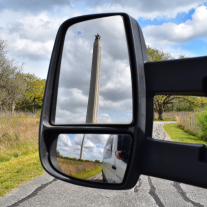
Reflection of San Jacinto Monument in side view mirror of a van

Do you know where General Santa Anna set up his camp during the Battle of San Jacinto or where General Houston was shot? How about where the Surrender Tree was located? Discover the San Jacinto Battleground like you've never seen it before on a staff-led van tour of the battlefield. Tours start shortly after the showing of Texas Forever!!

When: Tours start at 12:45 p.m., 1:45 p.m. and 2:45 p.m. and last about an hour.

Where: Tours leave from the San Jacinto Monument. Ask at the front desk if you are interested.

Age Range: All

Cost: Free with purchase of a ticket to the San Jacinto Museum.

Note: Our van can accommodate 14 passengers and is open to all on a first-come basis. The van is not handicap accessible. The program will be cancelled if there are no participants 15 minutes after the start time.

For more information, email [email protected] or call 281-479-2431.

Recommended Comments

There are no comments to display.

Join the conversation

You can post now and register later. If you have an account, sign in now to post with your account.

Guest
Add a comment...
Terms of Service

Account

Navigation

Search

Search

Configure browser push notifications

Chrome (Android)
  1. Tap the lock icon next to the address bar.
  2. Tap Permissions → Notifications.
  3. Adjust your preference.
Chrome (Desktop)
  1. Click the padlock icon in the address bar.
  2. Select Site settings.
  3. Find Notifications and adjust your preference.